Feeds:
Posts
Comments
DNA and Genealogy

I did the math. Honestly, I wish I hadn’t.

My AncestryDNA account lists 14,349 pages of matches, with 20 people per page. Even rounding down to 14,348 pages, that’s 286,960 DNA matches.

That’s 286,960 people who share some of my DNA and are probably related to me in some way. But my family’s hometown, Rincón, Puerto Rico, only has about 15,477 residents. Hmm?

I stared at that number for a while, then closed the browser tab.

It’s easy to feel overwhelmed. You open your match list hoping to discover your great-grandmother’s family, but instead it looks like a whole city’s worth of people.

Where do you even begin? Should you start? Would it be possible to finish?

You can do it, but only if you change how you think about the process.

You’re not just managing a list—you’re working with a database. As a former data scientist and database developer/architect in my “working life,” I can tell you that the first rule is simple: don’t try to look at everything at once.

The Reality of My Match List

Of those 286,960 matches, only about 10 were close matches with attached family trees. That’s not counting the 50 relatives I already know—siblings, uncles, nieces, nephews, and cousins.

I’m not complaining about other people’s trees—it’s just how big DNA databases work. Many people tested for health reasons, got a kit as a gift, or took the test years ago and never came back. Their profiles and DNA are there, but there’s no tree, surname, or location, so connecting them to your family takes a lot of detective work.

That detective work is worth it for the right matches, but you can’t do it for 286,960 people. You need to decide who deserves your time, which means having a filtering strategy before you even start.

The Principle: Do Not Start at the Beginning

When you open your AncestryDNA match list, it’s natural to want to scroll from the top and see what you find.

But if you do that, you’ll be exhausted within a week, or in my case, a few hours.

Instead, begin with a short list of priorities:

  1. Known close relatives
  2. Unknown close matches
  3. Matches with useful trees
  4. Shared-match clusters
  5. Matches tied to a specific research question you are already working on

Everything else can wait, but not forever. Just until one of those five categories gives you a reason to look further.

AncestryDNA offers tools to help: filters for relationship range, tree type, shared DNA, common ancestors, and SideView parent-side categories. You don’t have to review every match to use these tools well. Use them to narrow your working list to a manageable size.

After applying this approach, my working list is about 100 matches—not 286,960.

That’s manageable. It’s based on evidence, and it’s a number where real genealogical work is possible.

Step 1: Create a “Known Relatives” Framework

Before you check any unknown matches, label the people you already know. It is the step most people skip, and it is the most important one. Your known relatives are not research targets. They are anchors. They are the fixed points that allow you to sort everyone else.

Here is the framework I created for my own account:

DNA GroupWhat it Includes
Known: ImmediateParents, siblings, children, nieces and nephews
Known: MaternalMy mother’s siblings and their descendants
Known: PaternalMy father’s siblings and their descendants
Known: Vargas lineDocumented relatives from the Vargas family
Known: Valentin lineDocumented relatives from those lines
Research PriorityClose matches I cannot yet place
Endogamy cautionMatches appearing on multiple family lines

AncestryDNA lets you assign color-coded groups and add notes to your matches. Use both features.

Labeling a match as “Known: Paternal” and adding a note like “Dad’s aunts, uncles, cousins” takes just two minutes and can save you hours of confusion later.

The goal for your first pass through your matches is simple: label everyone you recognize. Don’t research them or build their tree—just label and move on.

Step 2: Do Not Delete or Ignore Siblings and Known Cousins

When I first tried to organize my matches, I wanted to filter out the people I already knew. I know my siblings and first cousins—so why keep looking at them?

Because they aren’t clutter—they’re your sorting system.

Here is what known relatives are actually for:

Known MatchHow to Use It
SiblingConfirms your shared family pool; use as a check on other close matches
First cousinExcellent anchor for one grandparent line
Second cousinExcellent anchor for one great-grandparent pair
Third cousinUseful for one second-great-grandparent line
Known cousin from RinconHelps isolate Rincon-specific clusters
Known cousin from the NYC diasporaHelps separate migration-era lines from island lines

If a match you cannot identify shares DNA with your known first cousin on your father’s side, that unknown match is very likely on your father’s side too. If they do not appear in your first cousin’s shared matches, they are probably on your mother’s side.

Your known relatives help you interpret every unknown match. Label them, keep them, and use them.

The note I add to every known relative is the same:

KNOWN. Do not research. Use as anchor for [line].

Step 3 (in Progress): Reaching Out

Once you’ve labeled your known relatives, you can look at the rest with a fresh perspective.

Who are these people?
What do their trees show?
Where did their families come from?

Finally, I decided to reach out to some of them. This part of the process surprised me. I thought it would feel like paperwork, but it doesn’t at all.

Every message I send goes to a real person. Some share my great-grandparents; others might connect through a distant ancestor I haven’t documented yet or through a branch I haven’t traced. Some have trees with familiar surnames, while others have names I don’t recognize, which can be an intriguing clue.

I write my messages in both English and Spanish. My family is Puerto Rican, and many of my matches are as well. If I wrote only in English, I’d miss out on connecting with many people who might respond.

Each message I send is prompted by something specific, a surname in their tree that matches my family, a connection to a town I’m researching, or a possible shared ancestor I’m trying to document. I don’t send the same message to everyone. I introduce myself, explain what we have in common, and share what I hope to learn.

Then I wait.

I’ve learned that waiting is actually part of the process. Most people don’t log into AncestryDNA often. Some reply in a day, some in six months, and some never respond. Waiting isn’t failure—it’s just how genealogy research by correspondence works, as it always has.

What Comes Next

This is just the start of the work.

Labeling known relatives and reaching out to close matches are just the foundation. These steps don’t give you all the answers, but they create a map by showing who connects to whom, which side of the family a match is on, and where to focus your research time.

The next steps in this series will cover:

  • Building your first working set of 100 to 300 priority matches
  • Using a four-level priority system to keep from drowning
  • Clustering your matches by shared family network
  • Working on a specific research question through DNA evidence
  • Understanding what Puerto Rican endogamy does to your cM totals and why your matches look closer than they are

Each of these topics will get its own post. We’ll proceed gradually.

If you’re just starting out and want a structured reference to go with this series, working through my matches made me think about what a first-time researcher really needs. That led me to create a step-by-step guide on the PuertoRicanGenealogy.org website: I Have My AncestryDNA Results. Now What?

The guide covers basics such as reading centimorgan values, using Shared Matches, attaching a tree, and the first steps in clustering. Both the blog series and the guide come from the same experience and are designed to work together.

Where are you in your DNA match list? How many matches do you have?
Please leave a comment below to let me know where you’re stuck. The number doesn’t have to feel overwhelming forever.

This Mother’s Day, I am spending time organizing old family photos and digitizing Sony microcassette recordings of interviews I made with my mother and other family members in 1996 and 1997.

My mom passed away on January 5, 2008. I think of her every day. I was blessed to have her as my mother, and I am also grateful that she gave me three wonderful siblings. Her love, voice, stories, and example continue to live in all of us.

As I listen to these old recordings, they remind me how precious family memories are. A person’s voice, laugh, stories, expressions, and memories are gifts that no one can replace once they are gone.

If you are fortunate enough to still have your mother, grandmother, aunt, or another beloved elder in your life, take time to record them. Use your phone to make a simple audio or video recording. Ask them about their childhood, their parents, their favorite memories, the places they lived, the food they cooked, the songs they loved, and the lessons they want future generations to remember.

You do not need fancy equipment. You only need a quiet moment, a few thoughtful questions, and the willingness to listen.

One day, those recordings may become one of the most treasured gifts your family owns. They are more than memories. They are a legacy.

This Mother’s Day, I honor my mother by preserving her voice, her stories, and the family history she helped me understand.

1946 – Photo at the Fiestas Patronales in Rincon

Below is Mom in about 1946; her photo was taken at a Fiesta Patronales in Rincón.

1950 US Census – Barrio Cruz, Rincón, Puerto Rico

In the 1950 U.S. census (see https://www.familysearch.org/ark:/61903/1:1:6F6C-QG2K?lang=en), Aurora Valentín Ramos was living in Barrio Cruces/Cruz, Rincón, Puerto Rico, with her parents and siblings. The household was enumerated on 10 April 1950 in Enumeration District 32-6, page 21, line 29.

Her father, Tomás Valentín Méndez, was listed as a 56-year-old married white male, born about 1894 in Rincón. He worked as an agricultor in the finca frutas menores industry. Her mother, Monserrate Ramos Muñoz, age 40, was also born in Rincón. Monserrate worked at home making or embroidering cloth gloves, recorded as hacer guantes in the bordado de guantes de tela en el hogar industry. During the last week of March 1950, she worked 20 hours.

1956 – Working in the Garment District in New York City

The following image shows my mom, who is in the middle back, sewing in a factory in the Garment District of New York City in 1956. In the 1950s, she earned $26/week ($24 after taxes) as a seamstress. She paid her brother $10/week for lodging.

Most Puerto Rican genealogists start in the same place: civil registration records, census data, and church baptisms. Those are the right first steps. But there is a whole category of historical sources that most researchers never open, and it is sitting online, free, waiting for you.

I am talking about newspapers.

Puerto Rican newspapers published birth announcements, marriage notices, obituaries, legal notices, property transactions, and ship arrivals. They named enslaved people as being freed and freedpeople as disputing labor contracts. They published the names of militia officers, business partners, and godparents. They covered events that left no trace in official records.

And the best collections are completely free.

Puerto Rico Electoral Census (1888): Voter Lists for Rincón and Mayagüez

Why Newspapers Fill Gaps That Other Records Cannot

Civil registration in Puerto Rico did not begin until 1885. Church records go back further, but they are incomplete, hard to access, and sometimes lost. For the decades between the 1840s and 1885, newspapers are often the best source you have for finding your ancestors by name.

Even after 1885, newspapers add something civil records cannot: narrative. A death certificate tells you when someone died. An esquela (the formal death notice published in Puerto Rican papers) may tell you where they were born, what they did for a living, who their parents were, which church they belonged to, and which relatives survived them. That is a life history in a single clipping.

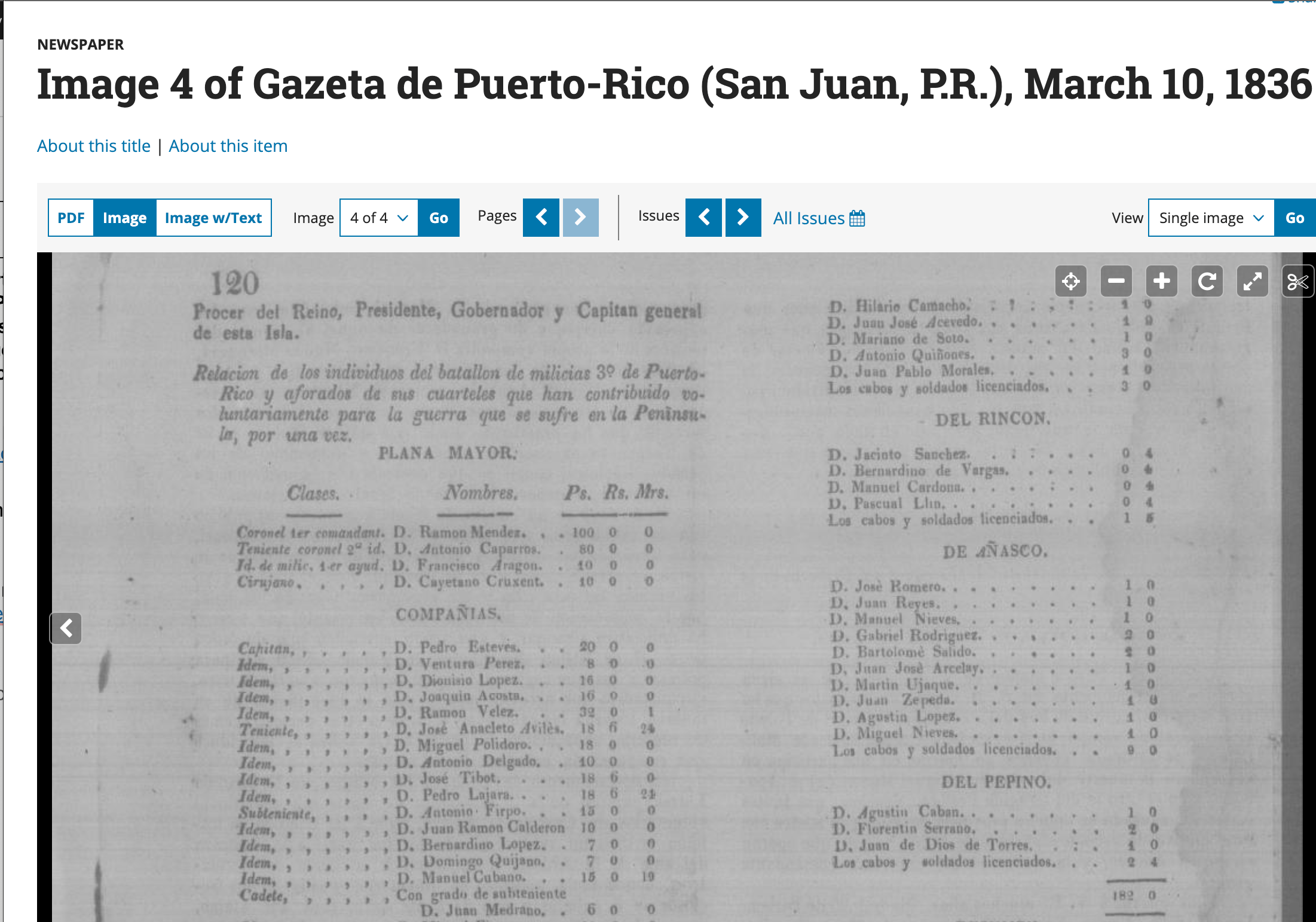
Legal notices in colonial papers reveal property, debt, and family structure in ways that go far beyond what a census captures. The Gaceta de Puerto Rico, the official Spanish colonial government gazette, published royal decrees, land grants, militia appointments, and slave trade records. It ran from 1806 to 1902, making it one of the longest-running and most genealogically rich newspapers in Caribbean history.

Six Puerto Rican Newspapers Every Genealogist Should Know

Gaceta de Puerto Rico (1806-1902)

The oldest and most authoritative paper on the island. As the official colonial gazette, it published government notices, legal records, property transactions, and announcements of births, marriages, and deaths. It is especially valuable for slavery research: manumission notices, runaway slave advertisements, and slave sale notices ran throughout the slavery period, which ended in 1873. After abolition, it published liberto (freedperson) labor contract disputes.

Chronicling America (Library of Congress) has 10,643 digitized issues from 1836 to 1902, fully searchable and free. Search the Gaceta de Puerto Rico

Boletín Mercantil de Puerto Rico (1839-1918)

The second most important paper of the colonial era. The Boletín Mercantil is especially rich for reconstructing the economic and social lives of ancestors connected to commerce, landholding, or elite networks. Property sales, business partnerships, and travel notices appear throughout its run. Chronicling America has 34 of 37 years in print available. Search the Boletín Mercantil

La Correspondencia de Puerto Rico (1890-1943)

Founded in San Juan on December 18, 1890 by Ramón B. López, this one-cent paper was designed to reach the general public and quickly became the largest circulating daily on the island, with a print run of 5,000 copies a day. It is considered the first daily news report in Puerto Rico accessible to a wider public. Vital notices in La Correspondencia often include detailed family information that you will not find in official records. Chronicling America holds issues from the late 1800s through the early 1900s. Search La Correspondencia

La Democracia, Ponce (1890-1948)

Founded and published by Luis Muñoz Rivera, Puerto Rican poet, journalist, and politician. La Democracia was first published in Ponce in 1890 and is valuable for political activity, community leadership, and land issues. Chronicling America has 4,244+ digitized issues from 1891 to 1907. Search La Democracia

El Mundo (1919-1990)

The major conservative daily of the 20th century, El Mundo is now fully digitized and open access. The archive covers 1919 to 1990 and is full-text searchable, making it an exceptional resource for 20th-century vital notices, obituaries, and local events. It was made publicly available through the GPA CRL Alliance, a partnership between East View Information Services and the Center for Research Libraries (CRL), funded specifically to benefit scholars and the general public at no cost. Search El Mundo

El Imparcial (1918-1970s)

Covered the political and economic impacts of U.S. control. Available through the Eastview Global Press Archive (subscription) and partially through the Digital Library of the Caribbean. Browse El Imparcial at dLOC

Free Platforms: Where to Search

Chronicling America (Library of Congress)
The best starting point for Puerto Rican newspaper research. Filter by state/territory (Puerto Rico), then by newspaper title and date range. Six Puerto Rican titles, more than 33,000 issues, 1756 to 1963. Free. chroniclingamerica.loc.gov

Digital Library of the Caribbean (dLOC)
The Caribbean Newspaper Digital Library (CNDL) holds 130+ 18th and 19th century newspapers from 22 Caribbean islands, covering 1718 to 1876. Built by a consortium of 90+ institutions including the University of Florida and Florida International University. Includes Spanish, English, and French language papers. Essential for tracking migration between Puerto Rico, Cuba, the Dominican Republic, and other islands. dloc.com

El Mundo Digital Archive
Full open access to 71 years of Puerto Rico’s major daily. Search by keyword, browse by date. No subscription required. UC Berkeley announcement with link

Archivo Digital Nacional de Puerto Rico (ADNPR)
Searchable repository of Puerto Rican archives, maps, newspapers, government gazettes, and periodicals. adnpr.net

Biblioteca Digital Puertorriqueña (UPR)
The University of Puerto Rico’s digital collections include newspapers, manuscripts, photographs, and rare books. upr.contentdm.oclc.org

Hemeroteca Digital (Biblioteca Nacional de España)
Spain’s national library has fully digitized and made searchable historical Spanish-language newspapers, including some with coverage of the Caribbean. Free. bdh.bne.es

What to Look For Once You Find the Right Paper

Once you find the right newspaper, search beyond just your ancestor’s name. Colonial and early 20th-century Puerto Rican papers published:

  • Birth, marriage, and death announcements with family details
  • Esquelas: formal death notices naming parents, spouse, children, and community ties
  • Property transfers, tax assessments, and probate filings
  • Business licenses and partnerships (many were family enterprises)
  • Guardianship appointments (which tell you there were minor children)
  • Ship arrival and departure lists (migration evidence)
  • Manumission notices and slave advertisements (pre-1873)
  • Godparent relationships (padrinos) that reveal extended family networks
  • Censo electoral para Diputados a Cortes (electoral census lists): official voter eligibility rolls for Spanish parliamentary elections, published in the colonial press

A note on electoral census lists: These rolls name voters by full name, municipality, barrio, and qualification (property ownership, income, or recognized occupation). Because voter eligibility was restricted to propertied and educated men, an ancestor’s appearance is a strong indicator of economic standing and places them precisely in a barrio at a specific date. If your ancestor does not appear, that does not mean they were not present: it means they did not meet the restricted criteria.

Search Tips That Will Save You Time

Try spelling variations. Surnames were Hispanicized, accent marks were dropped in typesetting, and transcriptions are imperfect. Search just the first three or four letters of a surname to cast a wider net.

Search for women differently. Women were often listed as “wife of [husband’s name]” rather than by their own name. If you cannot find a woman directly, search for her husband and read nearby announcements.

Browse when keyword searches fail. If you know approximately when your ancestor was alive in a particular town, browse issues from that period rather than searching by name. The context you find around other families will orient you.

Document your negative searches. If you searched a title, date range, and found nothing, write it down. A documented absence is a data point. It tells future you (and anyone reading your research) what was already checked.

Cross the colonial boundaries. Puerto Rican families moved between islands. The dLOC holds newspapers from Cuba, the Dominican Republic, and other Caribbean islands that may name your relatives in a way no Puerto Rican paper does.

Paid Options Worth Knowing

If you have a subscription, these platforms add depth:

PlatformWhat it holds
GenealogyBankPuerto Rican marriage records with biographical detail; claims 95% exclusive content
Latin American Newsstream (ProQuest)Full-text access to 41 Puerto Rican newspapers (requires university or public library card)

Start Here

If you have never used newspaper research for your Puerto Rican family, start with Chronicling America. Go to the site, select Puerto Rico as the state, and search your oldest known surname alongside the town your family came from. Spend twenty minutes browsing. You may not find your ancestor on the first try, but you will learn what the papers look like, how names were recorded, and what was happening in your ancestral town.

Newspapers do not replace civil records or church registers. They work alongside them. When the official record gives you a name and a date, the newspaper gives you the story.


*Want to go deeper? I have put together a free five-lesson mini-course on using Puerto Rican newspapers for genealogy, hosted at PuertoRicanGenealogy.org. It walks through each platform step by step, with search exercises and case studies. Check out Looking for Ancestors in Historical Puerto Rican Newspapers


© 2026 Sylvia Vargas. looking4myroots.co. All rights reserved.

If you have roots in the western side of Puerto Rico, chances are you’ve hit a wall trying to find records from the early 1800s. FamilySearch has a lot, but not everything. And some of the best records are sitting in places most people never think to look.

This week, someone in the Facebook group Sociedad Puertorriqueña de Genealogía shared something I hadn’t seen before: the Archivo Digital de Aguadilla. Free, online, and full of parish records going back to 1780. I want to walk you through what it is and how to use it, especially if you’re just getting started.

What Is the Archivo Digital de Aguadilla?

The Archivo Digital de Aguadilla is a free online archive of historical documents from Aguadilla, Puerto Rico. It was created by Haydée E. Reichard, and the heart of the collection is the Libros Parroquiales (Parish Books) from 1780 to 1843: baptism, marriage, and burial records from the parishes of Aguada and San Carlos Borromeo.

These are the kinds of records that can take you back generations before civil registration began in 1885. If your family is from the western part of the island, this archive is worth knowing.

The records have been alphabetized by surname, which makes it much easier to navigate than flipping through unindexed handwritten pages.

Browsing the Site

When you land on the site, you’ll notice it’s primarily in Spanish. Don’t let that stop you. Tools like Google Translate can help you read the navigation and any descriptions.

The site is organized into categories you can explore from the footer or sidebar:

  • Libros Parroquiales: Parish birth, marriage, and death records (this is the main collection)
  • Genealogía: Genealogical collections
  • Documentos Nuevos: Newly added documents
  • Ensayos: Historical essays
  • Other collections from researchers like Herman Reichard, Ramón Añeses, and Jaime González

Click the hamburger menu (the three lines, ≡) in the top right corner to access all sections, including Noticias, which is where they announce new additions to the archive.

How to Search

Here’s where it gets a little different from what you might be used to on FamilySearch or Ancestry. There are two ways to search, and the one that looks most obvious is actually the less useful one.

Option 1: Site-Wide Keyword Search
Go to “Buscar en Archivo Digital” in the main menu, type a surname, and click Buscar. This searches across all posts and pages on the site.

Option 2: External Archive Database (Better for Parish Records)
On that same search page, look for a link that says “BUSQUEDA”. Click it. This takes you to an external tool at archivonacional.com where the full Haydée Reichard collection is searchable as a proper database. This is the better option for finding a specific person.

Using the Parish Book Viewer

When you open one of the parish book entries, an embedded document viewer loads right on the page. It looks like this:

Inside the viewer, the records are sorted alphabetically by surname. You have a few options for navigating:

  • Use the Índice (Index) button to pull up a list of surnames and jump directly to the one you’re looking for.
  • Use “Otros Libros” (Other Books) to switch between the available volumes: baptisms, marriages, and death records across different years.

My Experience: The Search That Didn’t Work

I want to save you some frustration. When I first tried the site, I searched for “Acevedo” using the viewer’s built-in search bar. It came back with no results at all.

Search bar displaying the name 'Acevedo' with options for 'Exact match' and 'Whole words', indicating no results found.

I almost moved on. But I tried the Índice instead (again, click the hamburger menu ), and there it was: a long list of Acevedos.

A list of names and titles from a historical document dated November 19, 1814 to August 20, 1818, possibly related to individuals of 'blancos y pardos'.

The lesson: do not expect this search to work like FamilySearch or Ancestry.

  • Use the Índice.
  • Browse by letter.

The site was built differently, and once you understand that, it makes much more sense.

What You’ll Find Once You Get There

Once you locate a record, you’ll be reading handwritten text from the 1700s and 1800s. That’s both exciting and a little intimidating if you’ve never done it before.

There are no typed summaries or extracted data fields. You’re reading the original handwriting directly. A few things to keep in mind:

  • If you’re comfortable reading cursive in English, you can figure out many of the letters.
  • AI tools can help you get started with a transcription, but always verify what any AI produces by comparing it word-by-word to the original image. AI makes mistakes with old and new handwriting!
  • If you want to build your skills, the Spanish Paleography Digital Teaching and Learning Tool is a wonderful free resource designed to help people read early modern Spanish handwriting from the sixteenth and seventeenth centuries.

A Few Honest Limitations

This archive is a labor of love, not a commercial database. That means:

  • The collection is not exhaustive. Some years and volumes are missing because access to the originals was limited.
  • The site is primarily in Spanish.
  • The search tool inside the viewer does not behave like a modern search engine. Use the Índice.

For related Puerto Rico records, the Enlaces page on the site links to the broader Archivo Digital Nacional de Puerto Rico at adnpr.net, which is worth bookmarking.

One More Resource Worth Knowing

The same Facebook group also shared another resource this week: Rutgers University’s Digital Library of Historians of Puerto Rico.

This is a digital collection of books by Puerto Rican historians, including Francisco Moscoso, Fernando Picó, David Stark, and Francisco Scarcano.

If you’re not fluent in Spanish, having these books in digital form means you can use Google Translate to read them or use them as a reason to start learning Spanish. Context matters in genealogy, and these historians can help you understand what life was like for your ancestors.

Start Looking

If your family is from Aguadilla or the surrounding area, or if you simply want to push further back than civil records allow, give the Archivo Digital de Aguadilla a try. Go to the site, click on a book, and look through the index. You might be surprised what comes up.

And if you find something, share it with the community. That’s how we all move forward.

A few years ago, my Tia Vidalina gave me a box of Funeral Cards (“tarjetas de recuerdo“) from funerals she had attended over the years. Each card offered prayers and simple artwork to remember a loved one — cousins, uncles, aunts, parents, grandparents, and many others I don’t recognize but who mattered deeply to someone. To help keep this tradition alive, I returned the box with an album so she could store the collection properly. It’s a keepsake she may one day donate to a local historical society.

I scanned every card, and today I uploaded it to PuertoRicanGenealogy.org, where they can help other researchers trace their own Puerto Rican family histories. There are only 154 cards, but hopefully they will help others with genealogy research.

How the Dead Are Remembered in Rincón

In my family’s hometown of Rincón, Puerto Rico, deaths are not announced through newspaper obituaries. There are several reasons for this — the absence of a local paper, but more fundamentally, because earlier generations could not read. Both of my grandfathers were illiterate. My maternal grandfather was born in 1892 and died in 1973; my paternal grandfather was born in 1889 and died in 1985. They were farmers, and for them, education was a luxury unnecessary given the more immediate demands of tilling the soil and feeding a family.

To this day, a car with a loudspeaker drives through the streets of Rincón to announce deaths and share funeral details.

Funeral Cards are another way people preserve the memory of the dead. A card is printed for each person who passed, often with a prayer and a small image. People kept them, sometimes with a candle burning nearby, as a way to pray for the soul of the deceased or simply to hold them close. Tia Vidalina’s box represents decades of that practice — a physical archive of loss and remembrance that might otherwise disappear.

My First Wake: Cangelo Vargas, December 1968

My first experience of death and mourning came in December 1968. The head of the Vargas family in New York was my Tio Canjo — Cangelo Vargas — the oldest son of my paternal grandfather. He died on December 23, 1968, from a blood clot following surgery. He was the first person I lost.

Cangelo had come to New York with his cousins in the late 1930s. Work was scarce in Puerto Rico during the Depression years, and he took whatever jobs he could find — waiter, cook, hotel work of every kind — sending most of his earnings back to Rincón to support his father, brothers, sisters, and stepmother. In 1942, Cangelo and his cousins joined the Army after the United States entered World War II. After the war, he used the networks he had built in New York to help his brothers, sisters, and many cousins find work in the city, as employment on the island remained difficult to come by.

When Cangelo died, his body was sent back to Rincón so his father could bury him. No parent should face that, but life does not ask permission.

The Novena in Washington Heights

At the time, our family lived at 565 West 171st Street in Manhattan, and most of our Vargas and Valentín relatives were within a few blocks. That proximity made our community unusually tight, and it showed most clearly in grief.

Most families could not afford to travel to Puerto Rico for the funeral, so we held a novena — a nine-night rosary prayer — in New York. A novena was still done in Puerto Rico, but for families away from the rituals of saying goodbye to a loved one, this was the only affordable option. These gatherings were somber, but they also gave us children something we needed: the presence of family, a sense of continuity, and even, in moments, joy. Food was shared, stories were told, and the apartment was filled with people who loved the same man.

I don’t attend church regularly anymore, but I’ve never stopped finding the rosary useful. It functions for me as meditation — a ritual that quiets the mind and, when I’m far from family in Seattle, closes some of the distance. Catholic Mass in Seattle is not what I grew up with in New York. The music is different. The community is different. I miss what I knew.

Sharing What Survives

The cards I scanned from Tia Vidalina’s collection are now part of the archive at PuertoRicanGenealogy.org – Tools – Funeral Cards. Many of them belong to people I can identify within my own family tree. Others remain unknown to me, but they were known to someone, and that matters.

If you have a Funeral/Memory/etc/ Card you’d like to contribute, you can email puertoricangenealogygroup@gmail.com, and I will add it to our site’s database. If not, add it to a FindAGrave memorial page. I added one for Tio Canjo: Cangelo Vargas — FindAGrave Memorial.

These cards are small things, but they survive when people do not. I hope this collection helps someone find who they’ve been looking for.

Have you ever wondered what unknown stories lie in your family’s Puerto Rican roots? The pride, the memories, and the connections are closer than you think. During a recent visit with family in Puerto Rico, I found new motivation to keep working on http://www.puertoricangenealogy.org in the evenings.
Both my mainland and island cousins asked me how to begin researching their family history and where to find records.
It made me feel my “little” website was on the right track—which means you, too, can start discovering your abuelos’ stories tonight.

Below are the highlights of the website changes. Enjoy!

New Course: Navigating Puerto Rico’s Civil Records (Unlock post-1885 family records with confidence)

The site’s first intermediate-level course is now live and fully bilingual in English and Spanish. Navigating Puerto Rico’s Civil Records (1885 to Present) is a five-module guide that helps researchers go beyond basic name searches. Walk away able to trace three generations of your family in a single evening. Topics include:

  • Why 1885 is the key threshold date and what to do when records don’t exist before it
  • How to extract three generations of data from a single birth, marriage, or death record
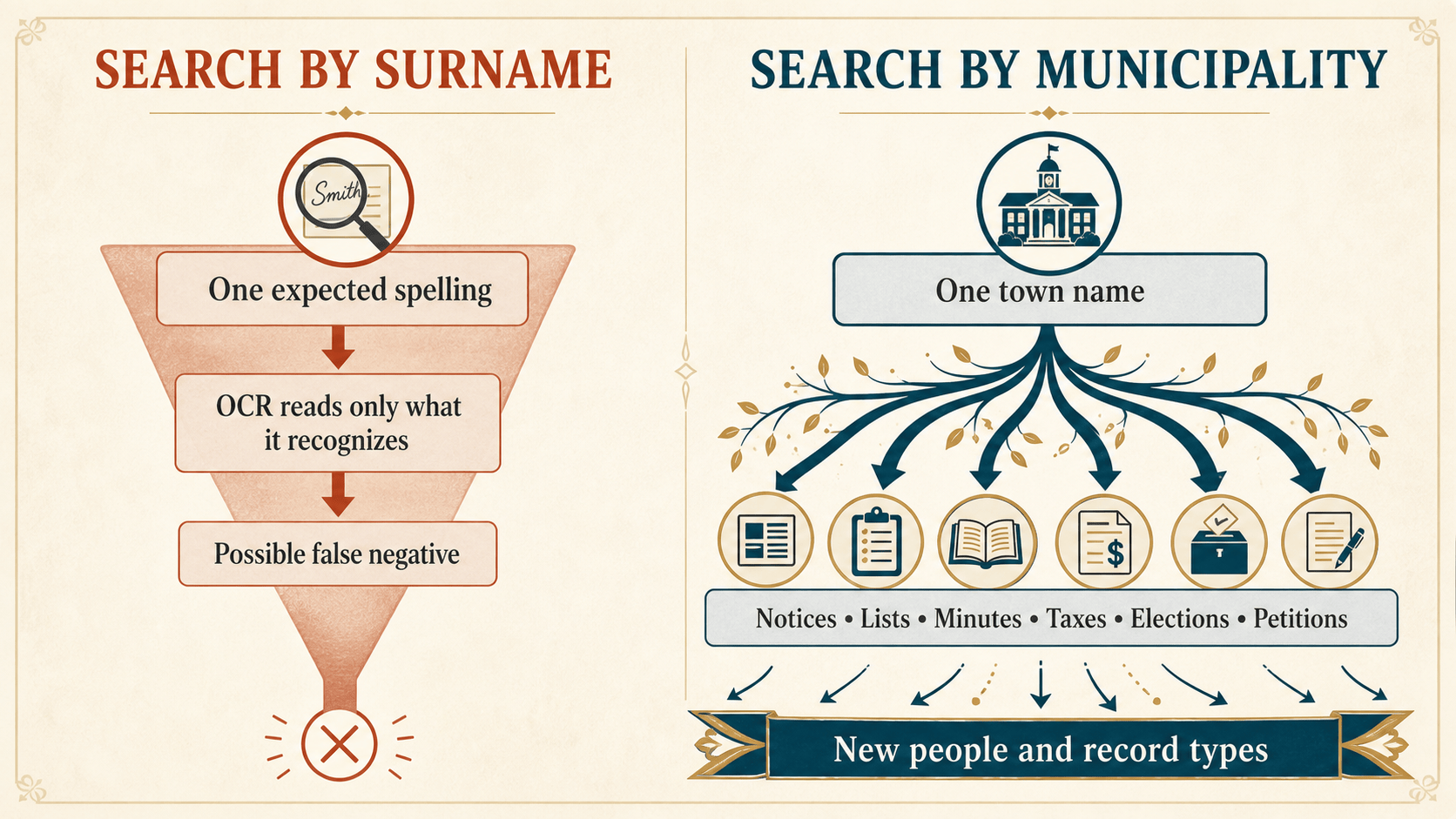
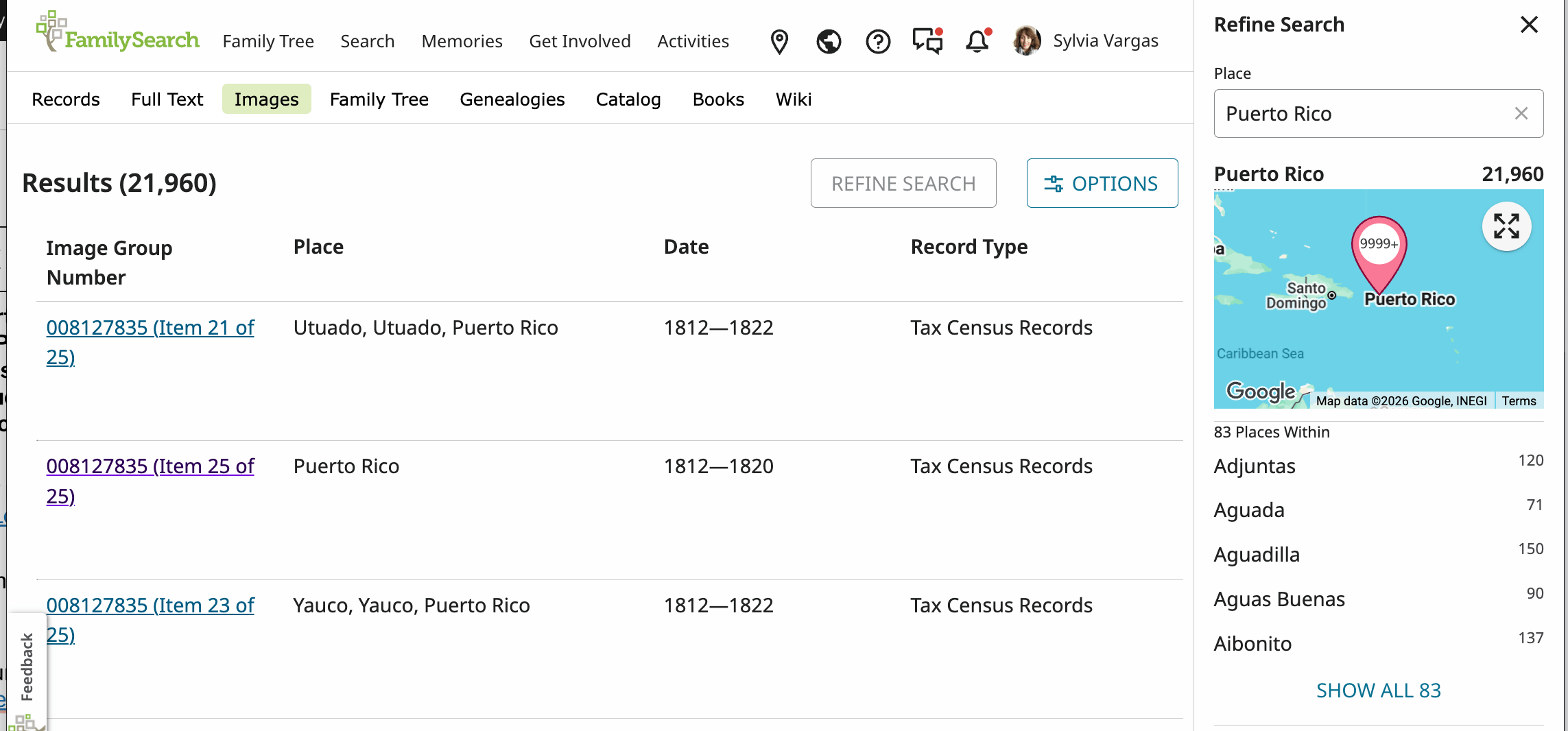
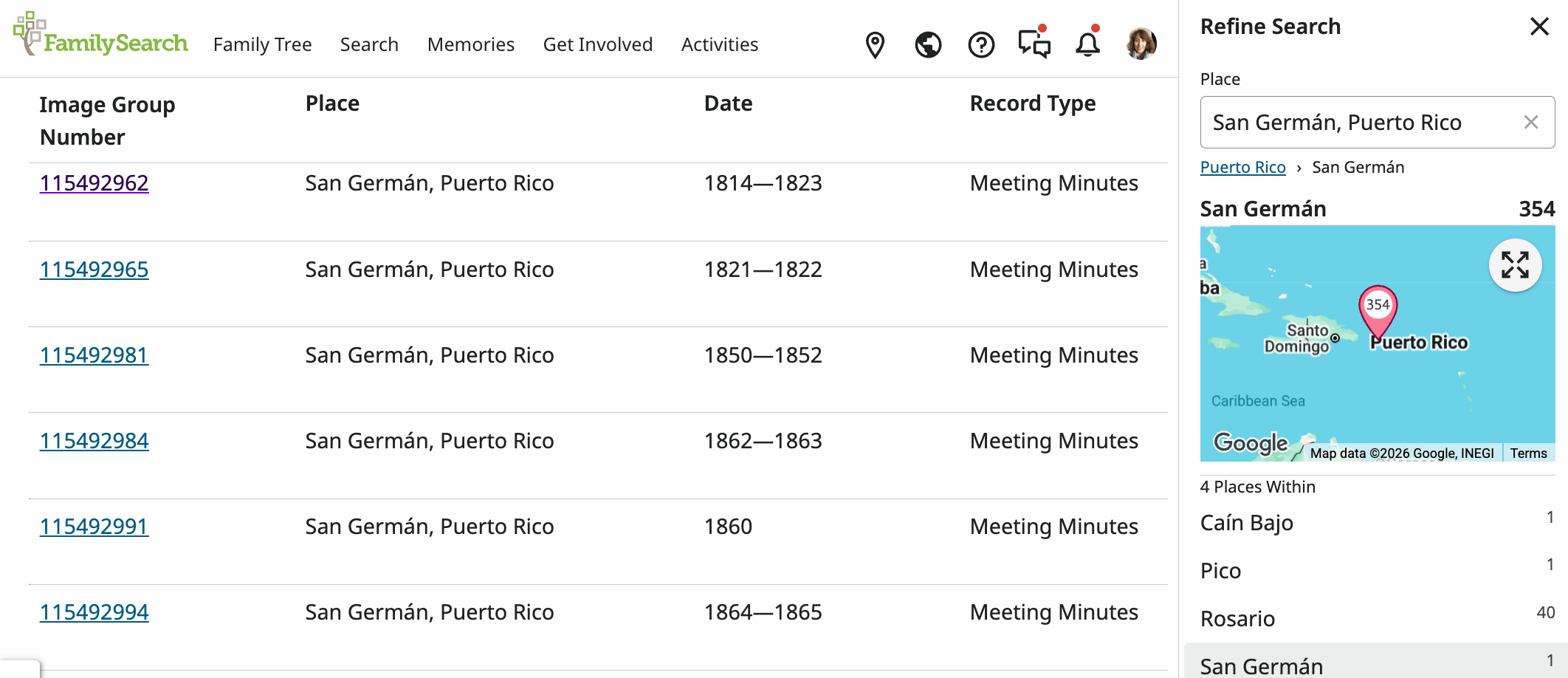
  • How to browse the FamilySearch Catalog by municipality to avoid incomplete indexes
  • Reading early 20th-century Spanish handwriting with vocabulary and practice exercises using original Rincón records
  • How to order certified copies today through VitalChek, in person, or by mail, and how to use civil records for Spanish dual citizenship applications
    The course uses real documents from Rincón, Puerto Rico, as hands-on teaching examples throughout.

New Tool: Family Group Sheet

A free, printable Family Group Sheet is now available in English and Spanish. You can fill out the husband/father, wife/mother, marriage details, and children’s fields directly in your browser, then print it or save it as a PDF.

  • No account is needed, and no data is saved.
  • The sheet follows Puerto Rican research conventions.

New Tool: Research Log (with CSV Import/Export)

The online Research Log tool has been significantly upgraded:

  • Export to CSV to download your entries as a well formatted spreadsheet file
  • Import CSV to reload a previously saved log, with options to merge or replace entries
  • Copy for Google Sheets lets you copy your log as tab-separated data with one click, so you can paste it directly into a spreadsheet (Excel or Google Sheets).
  • Google Sheets’ how-to guide is built into the tool.
  • Bilingual: Every update and tool you see here is fully available in Spanish at the same URL pattern. Both the English and Spanish versions offer the same depth and resources side by side, so you never have to wait or settle for a shortened version.

New Research Guide: Genealogical Spanish Glossary

This searchable reference guide includes over 100 Spanish terms organized into five categories: Vital Records, Relationships, Occupations, Locations/Administrative, and Archive/Record Terms.

  • It also has an abbreviation table and search tips.
  • The guide is available as a PDF download and as a web page in both languages.

New Research Guide: Genealogical Proof Standard (GPS)

This guide explains the GPS in plain language. The GPS is a five-element standard that defines what makes a genealogical conclusion reliable, with Puerto Rican examples throughout. It also covers the Three-Layer Analysis Framework (Sources / Information / Evidence) that supports thorough research. The guide is available in English and Spanish.

Census Records Section

The Census Records section now has actual content: a full write-up on Spanish colonial padrones (including the 1887 census PDF and scholarly resources), plus a section on the 1899 transitional census, which bridges the Spanish and U.S. periods.

Site-Wide Improvements

  • Status badges now appear on all guide and tool cards (Available, Coming Soon, or Overview Available) so visitors can easily see what’s ready.
  • Accessibility has been improved with a skip-to-content link, better heading hierarchy, and easier navigation on mobile devices.

For many years, I have met Puerto Rican descendants, those living outside the island of Puerto Rico, who want to learn about their ancestors but simply do not know where to begin.

Some do not speak or read Spanish fluently. Some have never searched a record before. Some feel disconnected from Puerto Rico but deeply curious.

So I decided to do something practical.

I created a free, self-paced Beginner Genealogy Course, available in both English and Spanish:

This is a practical resource for the Puerto Rican diaspora—and anyone who wants a structured, thoughtful way to begin researching their family history.


Why I Created This Course

I began researching my own family in 1991 while living in Seattle, Washington, far from my relatives in New York and even farther from Puerto Rico.

Back then, I spent hours at the National Archives in Seattle scrolling through microfilm. I made phone calls to my mother and extended family. I traveled whenever I could. I kept handwritten notes. I made mistakes.

Over the decades, I witnessed genealogy evolve:

  • From paper files to software like Family Tree Maker
  • From informal searching to the Genealogical Proof Standard
  • From isolated research to digital archives
  • And now, to AI-assisted workflows

I also completed genealogy coursework at the University of Washington in the 1990s and more recently returned to formal study through Salt Lake Community College’s genealogy certificate program.

What I learned through all of this is simple: beginners don’t fail because records don’t exist. They fail because they don’t have structure.

And for Puerto Rican families in particular, the lack of accessible bilingual beginner material creates an unnecessary barrier. This course is my attempt to bridge that gap.


Who This Course Is For

This course is for:

  • Puerto Ricans living on the island
  • Members of the Puerto Rican diaspora
  • English-dominant second and third generations
  • Spanish speakers who want structured guidance
  • Total beginners
  • Anyone who wants a methodical starting point

While it centers Puerto Rican research, the structure works for anyone starting their genealogy journey.


What’s Inside the Free Course

The course includes four core modules and companion materials:

  • Course Overview
  • Module 1—Start With Yourself
  • Module 2—Talk to Living Relatives
  • Module 3—Collect Basic Documents
  • Module 4—Keep a Research Log

The course is self-paced, online, and text-based. Each module can be downloaded as a PDF for local use.


What You’ll Walk Away With

By the end of the course, you will have:

  • A written record of what you already know
  • A list of meaningful questions to ask your relatives
  • Knowledge of where to find Puerto Rican records online—for FREE
  • A simple research log to track your work

This is not about building a giant online tree overnight. It is about building a solid foundation.


Companion Materials Included

You will also receive:

  • Quick Reference Card (PDF)—a printable one-page summary of all four modules and five beginner research questions
  • Google Sheets Templates (and PDF specifications), including:
    • Family Information Tracker
    • Research Log
    • Document Checklist

Key Free Resources Covered

The course introduces beginners to essential, free research resources, including:

While websites like Sociedad Puertorriqueña de Genealogía and Facebook groups like Genealogía De Puerto Rico are rich and valuable, they often assume prior experience or familiarity within the community.
My goal was to create a clear entry point before researchers move into more complex environments.


Why Bilingual Access Matters

Many Puerto Rican descendants living in the mainland United States do not read Spanish comfortably. Others on the island prefer to learn in Spanish.

Genealogy should not be limited by language.

By offering both English and Spanish versions, I hope to reduce that barrier and create a bridge between generations.


What This Is—and What It Is Not

This is not:

  • A shortcut to instant answers
  • A substitute for serious documentation
  • A commercial funnel

This is:

  • A structured beginning
  • A practical toolkit
  • A starting point grounded in decades of lived research experience

I have been doing this work for over 30 years. If I could sit down with every beginner personally, this is exactly how I would guide them.


If You’re Ready to Begin

You can access the course here:

It is completely free.

If you find it helpful:

  • Leave a comment on this post
  • Share it with family members
  • Send it to a cousin who has been “meaning to start.”

Structure creates confidence. Confidence creates momentum.

Genealogy is not just about names and dates. It is about dignity, memory, and connection.

This is the third version of this article. I got feedback from great minds in the Facebook Group “Genealogy and Artificial Intelligence”, for which I am very grateful.

The Cliff Notes:

The guide explains that AI is a powerful tool for genealogy, especially for transcribing handwritten records and generating research ideas. However, we should use it responsibly, taking into account different levels of risk.

Key Principles:

  • Risk-Tiered Sharing: The article discusses the distinction between public, non-sensitive records of deceased individuals (low risk) and information that identifies living people (high risk). Public historical records are usually safe to analyze with AI.
  • The “Temporary Mode” Tool: Genealogists should use ChatGPT’s Temporary Mode when handling sensitive historical data, such as records concerning slavery or institutionalization, or when conducting research they intend to copyright or publish.
  • Privacy Pitfalls: The post warns not to use the “Share” feature, pointing to a July 2025 incident when shared conversations appeared in search engine results. Treat “Share” as if you are publishing to the internet.
  • Transcription Benefits: AI is described as a breakthrough for transcribing hard-to-read 19th-century handwriting, like Spanish colonial records or German surnames. It can save time and money compared to doing it by hand.

The “Golden Rules” for Genealogists:

  • Protect the Living: Never post current addresses, phone numbers, or details of minor children.
  • Redact or Use Temporary Mode: Use privacy settings for unpublished or sensitive historical content.
  • Verify Everything: Consistent with genealogical standards, researchers should fact-check AI outputs and monitor changes to AI companies’ privacy policies.

In summary, AI can greatly help us understand history, but it should be used carefully and ethically, just like any other genealogical source.

Why I’m Writing This

I love using AI tools for genealogy research. Since late 2024, I’ve discovered that ChatGPT and other chatbots help me brainstorm research strategies, understand confusing historical documents, and even build websites for my genealogy projects. AI is genuinely useful.
But I’ve also learned that using AI tools wisely means understanding how your information is processed.

This guide is not an argument against using AI on historical records. In fact, using AI to read, transcribe, summarize, and analyze public, non-sensitive records about deceased people is often a reasonable and powerful use case—and it’s already widely practiced across the genealogy ecosystem.

The real goal here is narrower and practical: protect living people’s privacy, protect your unpublished work, and avoid accidental public sharing.

Important: I’ve included sources for every major claim in this article.
As genealogists, you know how to evaluate evidence. You should do the same here.
Please fact-check what I say by reading the official sources from OpenAI and the journalists who covered the 2025 sharing incident. The sources are at the end of this guide, and I encourage you to verify everything yourself.


The Real Situation: What Happens to Your Data?

When you type something into ChatGPT, here’s what matters:

OpenAI (the company behind ChatGPT) can see what you write.
OpenAI processes the input you submit to generate responses. Depending on your settings and the product mode you use, some content may also be used to improve models.
The key is: assume anything you paste could be retained or reviewed unless you intentionally choose privacy-preserving settings.

You have control over how much of your data OpenAI keeps. If you use Temporary Mode (available on ChatGPT Plus and Free plans), your conversation isn’t saved for training purposes. However, OpenAI still processes it to provide answers.

Think of it like this: If you ask a question at your local library, the librarian can see what you’re asking. They might remember it to improve their reference services. But if you use a “request a service anonymously” option, they process your question, help you, and don’t retain notes about it afterward. OpenAI’s Temporary Mode works similarly—they help you, but they don’t keep records.


The Simple Rule for Genealogists

Use a risk-tier mindset:

  1. Never paste data about living people (addresses, phone numbers, emails, full DOBs, minor children, private family stories) unless you have a clear consent-based reason and you’re using privacy-preserving settings.
  2. Public records about deceased people are usually fine to analyze with AI—especially when they’re already broadly accessible (e.g., older census pages, historical newspapers, probate abstracts).
    Don’t treat “public” as automatically “dangerous.”
  3. Use Temporary Mode when you’re pasting anything that is:
    • about living people, or
    • your unpublished research/transcriptions, or
    • sensitive even if historical (adoption, assault, medical details, slavery, etc.), or
    • restricted by website/archive terms or copyright.

Why this matters: Genealogy already battles “privacy” being used as a blanket excuse to restrict access to historical records. We should protect the living without accidentally arguing for broad restrictions on public historical documents.


What You Can Safely Ask ChatGPT (Without Worrying About Privacy)

Safe questions—use any ChatGPT plan:

  • “How do I find naturalization records for someone who arrived in New York in 1910?”
  • “What’s the best way to search for German immigration records?”
  • “How do I evaluate conflicting birth dates in census records?”
  • “What was happening in Puerto Rico in 1880 that might explain emigration?”
  • “Help me organize my research notes—I have census records, church records, and naturalization documents. What’s a good system?”
  • “How do I write a family history essay?”
  • “What should I look for in a baptism record from 1850s Spain?”
  • “Can you transcribe this handwritten 1880s census record?”
  • “I’m having trouble reading this word in an 1800s document. It looks like ‘Schindhel’ or ‘Shindhel’—what German surnames are similar?”
  • “I can read most of this baptism record from 1875, but a few words are illegible. Based on Spanish colonial records, what words commonly appear in this context?”

Why transcription is often low-risk: Many commonly used genealogical records describe people who are almost certainly deceased, and the content is frequently already public or broadly accessible. In those cases, the privacy risk is generally low.

But “historical” doesn’t always mean “non-sensitive.” Some older documents contain intensely personal information (illegitimacy, institutionalization, abuse, adoption, enslavement). Treat sensitivity as its own category—separate from whether the person is living.


What You Should NOT Paste Into ChatGPT (Without Privacy-Preserving Settings)

Be careful with anything that includes:

  • Living people’s identifiers: address, phone, email, workplace, minor children, full date of birth, account numbers, student IDs
  • Recent vital records that could reasonably involve living individuals (depending on jurisdiction and context)
  • Private family material, such as letters, texts, emails, and family conflict narratives, that are not yet public.
  • Unpublished work product: your original transcriptions, research notes, proof arguments, draft chapters—especially if you plan to publish

Why: The main risk isn’t “AI analyzing records.” The main risk is unintended disclosure of living-person data, plus losing control of unpublished research and writing.

Temporary Mode: Your Privacy Tool

What it does: Temporary Mode tells OpenAI “process this conversation to help me, but don’t use it for training and don’t save it after I leave.”

How to use it:

  • Open ChatGPT Plus or Free
  • Look at the top of the window—you’ll see a toggle for “Temporary mode”
  • Turn it ON
  • Have your conversation
  • When you close the tab, the conversation disappears

What Temporary Mode does NOT do:

  • It doesn’t encrypt your data (OpenAI still sees it while processing)
  • It doesn’t make your data invisible to the OpenAI company
  • It doesn’t protect you if you share the conversation with someone else later

It DOES:

  • Prevent your conversation from being used to train the AI
  • Prevent OpenAI from keeping a record of your chat
  • Make your data less useful to the company

When to use Temporary Mode: You’re pasting a specific document and asking for help analyzing it. You want fast, focused help without a permanent record.


A Practical Workflow for Genealogists

If you’re asking methodology questions:

  • Use regular ChatGPT (no Temporary Mode needed)
  • “How would I find records for someone who emigrated from Ireland in 1920?”
  • Save the conversation if you want to refer back to it

If you’re asking for help with a specific document:

  1. Turn ON Temporary Mode
  2. Paste the document or describe it: “I have a census record from 1880 with handwritten entries. I can’t read this word—it looks like it starts with ‘S’. What might it be?”
  3. Ask your question
  4. Get your answer
  5. Close the tab—the conversation is gone, and your document wasn’t used for training

If you’re collaborating with another genealogist:

  • Don’t use ChatGPT’s “Share” feature (see below)

    Instead, copy the key points into an email or shared document or describe the conversation verbally or in a message

A Special Case: Transcribing Historical Documents

Transcription is different from analysis. It’s one of the best uses of AI for genealogy, and the privacy concerns are much lower when you’re working with documents from the 1800s or earlier.

Why Historical Documents Are Safer

If you’re transcribing a document from 1800, 1850, or even 1920, the people in those records are almost certainly deceased. The information is historical, not current. A census record from 1880 is a historical document—it’s not identifying living people.

Examples of safe documents to transcribe:

  • Census records from 1800-1950
  • Church baptism, marriage, and burial records from any era
  • Naturalization papers from 1800-1930
  • Military records from WWI or earlier
  • Property records from the 1800s
  • Ship manifests and immigration records
  • Wills and estate documents
  • Newspaper clippings from decades ago

Many of these can be pasted with relatively low privacy risk when they clearly concern deceased individuals and don’t contain sensitive content.
When in doubt—especially with edge cases—use Temporary Mode or redact identifiers.

Also consider access terms and copyright. “Publicly viewable” does not always mean “free to reuse or upload anywhere.” Some sites and archives have terms that restrict redistribution or bulk reuse. Privacy and permission are different issues—both matter.

Why You Might Still Use Temporary Mode

Even though historical documents are safe in terms of privacy, you might still want to use Temporary Mode for transcription because:

  1. You’re building a unique resource.
    If you’re the first person to transcribe a particular document, that transcription becomes your intellectual work. Using Temporary Mode means OpenAI won’t keep a copy for training.
  2. You plan to publish.
    If you’re transcribing for a genealogy book or article, use Temporary Mode so ChatGPT doesn’t see the document before you publish it.
  3. The document contains sensitive historical information.
    Some 1800s documents mention slavery, abuse, or other sensitive topics.
    You might prefer not to have OpenAI process them, even though it’s legal.

But here’s the important part: If you’re transcribing a historical document from the 1800s just to help yourself understand your family history, you don’t need Temporary Mode. The privacy risk is minimal.

Avoiding Privacy Overreach

It’s reasonable to protect living people’s privacy in genealogy. It’s also easy to go too far and accidentally reinforce the idea that historical records should be restricted simply because they contain personal facts.

A practical line to hold:

  • Protect the living.
  • Handle sensitive historical content thoughtfully.
  • Don’t treat public, non-sensitive records about deceased people as off-limits for AI.

That balance keeps genealogists on the right side of ethics without helping institutions justify unnecessary record closures.


How to Use ChatGPT for Transcription

Method 1: Screenshot or Image

  1. Take a photo of the handwritten document
  2. Upload the image to ChatGPT (click the image icon)
  3. Ask: “Can you transcribe this handwritten document into typed text?”
  4. ChatGPT will read the handwriting and type it out

This works surprisingly well for 1800s documents, even with difficult handwriting.

Method 2: Describe What You See

If the image is unclear or ChatGPT has trouble:

  1. Type what you can read: “I have a census record from 1880. The first line says ‘Maria [illegible] wife of John Smith, age 35, occupation: farmer.’ The second line is almost completely illegible except for what looks like ‘Puerto…’ Can you guess what common words might fit?”
  2. ChatGPT can help you figure out what illegible words might be based on context and common names of the era.

Method 3: Paste Text and Ask for Help

  1. Type out what you can read from the document
  2. Ask: “I’ve transcribed this document, but there are [number] words I couldn’t read. Here are the gaps: [illegible], [illegible]. Based on the context and the era this document is from (1880s Puerto Rico), what might these words be?”
  3. ChatGPT can suggest possibilities based on historical context.

Example: Transcribing a Historical Document

You ask ChatGPT:
“I’m transcribing a baptism record from 1875 in Puerto Rico. The handwriting is difficult. Here’s what I can read: ‘En el año de mil ochocientos [illegible], en [illegible] día del mes de [illegible]…’ Can you help me guess what the illegible words might be?”

ChatGPT responds with:
“Given the date format and Spanish colonial records, those gaps likely are: ‘mil ochocientos setenta y cinco’ (1875), a day number like ‘dieciséis’ or ‘veinte’, and a month name like ‘enero’ or ‘febrero’. The full phrase would typically be ‘[day] día del mes de [month]’.”

This is incredibly helpful, and you’re not exposing living relatives—you’re getting help with a historical document.

Privacy Summary for Transcription

Safe to paste into ChatGPT without Temporary Mode:

  • Historical documents (1800s and early 1900s) with names, dates, locations of deceased people
  • Church records
  • Census records
  • Naturalization papers – before 1920s
  • Military records
  • Ship manifests
  • Property records (before 1920s)

Use Temporary Mode if:

  • You plan to publish the transcription
  • You’re building a unique research database
  • You’re uncomfortable with OpenAI having copies of the documents

Never paste (even with Temporary Mode):

  • Documents with living relatives’ current information –
  • Records with addresses or contact information of living people –
  • Anything that identifies someone currently alive

Why This Matters for Your Research

This is one area where AI is genuinely transformative for genealogy. Before AI transcription tools, you had to: – Struggle with handwriting yourself – Send images to other researchers and wait for help – Pay for professional transcription services – Accept that some documents would remain partially unreadable

Now, you can upload a photo of an 1800s document and get a transcription in seconds. This is a revolutionary tool for genealogists who work with Spanish colonial records, German immigration documents, or any other historical handwriting.

The key: Historical documents are safe. You’re working with the past, not exposing the present. Use that to your advantage.


Don’t use SHARE for genealogical research.

Here’s why:
In July 2025, thousands of shared ChatGPT conversations appeared in Google search results. People who clicked “Share” to send a conversation to a colleague or friend ended up making it searchable by the entire internet. Some contained sensitive family information, medical details, and personal conversations.

OpenAI fixed this problem and removed the feature, but the lesson is clear: “Share” means “publish to the internet,” not “send to one person.”

If you need to share your analysis with someone:

  • Describe it in an email
  • Copy the key points into a document
  • Take a screenshot
  • Anything except clicking the “Share” button

Why This Matters: Three Real Scenarios

Scenario 1: Your Research Gets Published (And So Does Your Data)

You’re researching the Martinez family. You paste their naturalization records into ChatGPT for help with translation. Later, you publish a genealogy article about the Martinez family. Months later, a researcher on the same family tree stumbles across your ChatGPT conversation in OpenAI’s training data—they can see not just your published work, but also your research notes, your questions, and the documents you used. You lose your competitive advantage.

How to avoid it: Use Temporary Mode for any document you plan to publish.

Scenario 2: You Share a Conversation, and It Becomes Public

You’re collaborating with your cousin on family history. You create a ChatGPT conversation analyzing migration patterns and click “Share” to send the link to your cousin.

You think they’re the only one who can see it. But if the “Make this chat discoverable” option was enabled, that conversation is now searchable on Google, with all the family names, dates, locations, and relationship information you discussed.

How to avoid it: Never use the Share feature. Send a description, a screenshot, or the key points in an email instead.

Scenario 3: A Living Relative’s Privacy

You’re researching your family tree and discover a living aunt’s maiden name, her current address, and her children’s names in historical records. You paste these documents into ChatGPT to ask for help finding more information about her. Your aunt never consented to having her current information analyzed by AI. You’ve made a choice about her privacy without her permission.

How to avoid it: Before pasting any document with living relatives’ information, ask yourself:
“Would they want OpenAI to see this?” If the answer is no, don’t paste it.


Quick Reference: What to Do

Before you paste anything into ChatGPT, ask yourself:

  1. Does this contain living relatives’ names or current information?
    • If yes: Don’t paste it, or use Temporary Mode
  2. Am I planning to publish research based on this document?
    • If yes: Use Temporary Mode
  3. Would I be comfortable with a stranger reading this?
    • If no: Use Temporary Mode or don’t paste it
  4. Am I about to use the “Share” button?
    • If yes: STOP. Use email or a screenshot instead

What to do instead of pasting documents:

  • For translation help:
    Describe the problem. “I have a handwritten word in a 1840s record that looks like ‘Schindhel’ or ‘Shindhel’. It’s a German surname. What spellings are similar?”
  • For transcription help:
    Type a few words manually and ask about the rest. “The first line says ‘Maria [illegible] wife of…’ What might the middle name be?”
  • For methodology help:
    Ask without the documents. “I found two different birth dates for my ancestor. How should I evaluate which one is more reliable?”
  • For collaboration:
    Copy key findings into an email. Don’t send a ChatGPT link.

The Bottom Line

ChatGPT is genuinely helpful for genealogy. It’s excellent for: – Brainstorming research strategies – Understanding historical context – Working through conflicting evidence – Learning how to approach a research problem

Just be intentional about what you share. The same care you use to evaluate historical sources should guide how you use AI tools.

Main rules:

1. Protect living people’s information (and redact when needed)
2. Use Temporary Mode for living-person data, sensitive content, or unpublished work
3. Public, non-sensitive records about deceased people are generally reasonable to analyze with AI
4. Treat “Share” as “Publish” and avoid it for genealogy

That’s really all you need to know. Use the tools, get the benefits, and keep your family’s research safe.


For Questions About OpenAI’s Current Policies

OpenAI changes its policies frequently.
To verify the current state of Temporary Mode and other privacy features, check: – https://openai.com/policies/ – https://help.openai.com/en/articles/7730893-temporary-chat


What About Other AI Tools?

This guide focuses on ChatGPT because it’s the most popular tool among genealogists.
Google Gemini and Claude work similarly—they both can see what you type and offer privacy options.
The same rules apply:
– Be thoughtful about what you share.
– Use privacy modes when available.
– Never use share features for sensitive genealogical data.

If you’re curious about other tools, the principles are the same. The specific features change, but protecting your research and your family’s privacy is always the priority.


Sources for This Guide—Please Fact-Check

I believe it’s important that YOU verify the claims in this article yourself.
Please note that while I was writing this, the links to various AI vendor policies changed, and some URLs may be broken.
Here are the sources I used, so you can check them and confirm that what I’m saying is accurate:

On ChatGPT’s Temporary Mode:

On the July 2025 ChatGPT Sharing Incident: When ChatGPT’s share feature made conversations searchable by Google and other search engines, multiple sources documented the issue:

On how OpenAI responded:

General AI and Privacy Information:

Why I’m Including These References:

You should never take my word for it—or anyone’s word for it. These are technical and privacy matters that affect your family’s information. If you’re going to follow the advice in this guide, you should:

  1. Check the sources yourself
  2. Verify that the features I describe are still accurate (policies change)
  3. Read OpenAI’s official documentation directly
  4. If you have questions, contact OpenAI support with a screenshot of what you see on your screen

The links above will let you verify every major claim in this guide. If something has changed, or if you find that the current version of ChatGPT works differently than I’ve described, please send me an update at the contact information on looking4myroots.com.

A Note on Fact-Checking and AI Tools:

As genealogists, you’re trained to evaluate sources.
You know to ask:
Who wrote this?
Is this primary or secondary evidence?
Does it have bias?
Could it be outdated?

The same skepticism applies to AI guidance.
– Don’t assume any article (including this one) is complete or the truth.
– AI company policies change frequently, sometimes without clear announcements.
– The features available today may not be available next month.

Always verify current information by:
– Going to the official company website (openai.com, not a blog post)
– Checking your own account to see what options are actually available
– Testing the feature yourself before relying on it for sensitive work
– Asking OpenAI support directly if you’re unsure

That’s how careful genealogy research works, and it’s how careful AI tool usage should work too.

In genealogy, there are moments when separate records suddenly align—and a life comes into sharp focus. This is a story about how the 1856 Citizenship Act worked for a German immigrant.

I rarely experience those moments of clear documentation and process while conducting my family genealogy research in Puerto Rico. I did this research for my partner’s family.

For Charles P. Schindhelm, a 26-year-old immigrant from Saxony, Germany, June 1856 was one of those defining moments.

Within three weeks, all in Howard County, Missouri, he:

  • Secured a marriage bond
  • Became a naturalized U.S. citizen
  • Married Nancy M. Stapp

Two records in the Howard County Circuit Court (Book 3, page 257) reveal a deliberate, carefully sequenced transition from immigrant youth to American citizen and husband.

For Charles P. Schindhelm, a 26-year-old immigrant from Saxony, Germany, June 1856 was one of those defining moments.

The Naturalization Record

On Thursday, 5 June 1856, Charles P. Schindhelm appeared before the court in Fayette, Missouri.

The record describes him as “an alien foreigner, a native of Saxony in Germany, aged 26 years”.

From this sworn testimony, we learn:

  • He immigrated to the United States in 1845
  • He had resided continuously in the U.S. since arrival
  • He arrived as a minor (approximately age 15)
  • He renounced allegiance to the King of Saxony
  • He swore to support the Constitution of the United States and the State of Missouri

The court admitted him “to all the rights of citizenship.”

This document provides the first definitive year of immigration for Charles: 1845.

For immigrant research, that single detail is gold.

The Marriage Record

On 24 June 1856, the court recorded the marriage of Charles P. Shindhelm and Nancy M. Stapp.

The officiant was William M. Ruston.

Notice the spelling: Shindhelm — without the “c.”

Across records, his surname appears in multiple forms: Schindhelm, Shindhelm, and Shinthelm.

This pattern reflects phonetic spelling by English-speaking clerks rather than a name change.

A Remarkable Timeline

~1830 Birth in Saxony (calculated from age 26 in 1856)
1845Immigration to United States
June 2, 1856Marriage bond issued
5 June 1856 Naturalized as U.S. citizen
24 June 1856Marriage to Nancy M. Stapp


The sequencing is striking: Bond → Citizenship → Marriage

Charles did not become a citizen years earlier. He did it between securing his marriage bond and standing at the altar.

That was not accidental.

Why Naturalize Before Marriage?

In 1856 Missouri, citizenship strengthened property rights, solidified legal standing, and demonstrated long-term commitment to the United States.

Charles had been in America for eleven years. In June 1856, he formalized his allegiance. Nineteen days later, he began his married life.

That suggests planning.

Research Implications

  • Search Baltimore passenger lists for 1845 arrivals
  • Locate Charles’s Declaration of Intention (ca. 1852–1853) in Missouri courts
  • Research Saxon parish records for a birth or baptism around 1830

Conclusion

A young man leaves Saxony at fifteen.

Eleven years later, in a small Missouri courtroom, he renounces a European king and swears allegiance to a new republic.

Nineteen days after that, he marries.

That is not just paperwork.

That is identity.

That is intention.

That is commitment.

And because one clerk recorded it carefully in June 1856, we can reconstruct it today.

Citation

Howard County (Missouri), Circuit Court Records, Book 3, p. 257, “Naturalization of Charles P. Schindhelm,” 5 June 1856; and marriage return of Charles P. Shindhelm and Nancy M. Stapp, 24 June 1856; Howard County Courthouse, Fayette, Missouri; digital images in researcher’s collection.


Are you stuck in your Puerto Rican genealogy research?
Do you have a parish record with no information?
Has a surname disappeared from the civil registry?
Are you having trouble finding an ancestor who lived in Puerto Rico before 1900?

Please bring your most challenging research problem to the group discussion on Monday February 9th!

Researchers from various levels will exchange tips, tools, and strategies to overcome common obstacles.

Join our collaborative roundtable discussion where researchers share tips, tools, and strategies to help overcome common research challenges.

Special Presentation:
César Zapata-Lozada will show how municipal council records (Actas de Cabildo) can unlock genealogical evidence that parish and civil records miss—using the case of Ramón Ramírez de Arellano (San Germán, 1814). Based on his blog post “Las Actas de Cabildo como Fuente para la Investigación Genealógica.

Date & Time: Monday, February 9, 2026 7:00 pm (EST) | 8:00 pm (Puerto Rico) | 4:00 pm (PST)

After registering, you will receive a confirmation email with meeting details.
Note: This meeting will not be recorded.

All experience levels are welcome—whether you’re just starting or deep into your research.

Stay Connected
Website: https://sites.google.com/view/puertoricangenealogygroup/home
Email: puertoricangenealogygroup@gmail.com To join our mailing list or submit a question, email us anytime.
New Website (Coming soon): https://sylviavargas.github.io/puertoricangenealogygroup/

Conectando Raíces, Celebrando Herencia